
Kuse
Open Website-
Tool Introduction:Kuse AI turns files, videos, and links into structured deliverables.
-
Inclusion Date:Oct 28, 2025
-
Social Media & Email:
Tool Information
What is Kuse AI
Kuse AI is a multimodal workspace that transforms unstructured inputs—files, videos, and links—into structured, visual outputs. It goes beyond chat by analyzing your materials, recognizing your goal and audience, and drafting the right deliverable in your format and tone. Create documents, slide decks, pages, and meeting briefs faster, with tables, charts, and outlines generated from messy content. With context-aware synthesis and flexible templates, Kuse accelerates research, planning, and communication while keeping your workflow front and center.
Kuse AI Main Features
- Multimodal ingestion: Upload PDFs, spreadsheets, videos, and URLs; Kuse consolidates scattered inputs into one working canvas.
- Structured output generation: Produce documents, slide decks, pages, and meeting briefs with clear sections, tables, and checklists.
- Context-aware deliverables: Align outputs to your goal, audience, tone, and constraints for higher relevance.
- Visual synthesis: Turn raw data into charts, timelines, and matrices to communicate insights clearly.
- Content remix: Convert a doc into slides (and back) or repurpose assets across formats without starting over.
- Template and style control: Apply brand-friendly structures, headings, and voice for consistent presentation.
- Workflow acceleration: Prep for meetings with agendas, briefings, and follow-ups generated from notes and links.
- Source awareness: Keep references tied to your inputs so you can trace where claims or excerpts came from.
- Collaboration-friendly: Share drafts, collect feedback, and iterate quickly with teammates.
Kuse AI Ideal Users
Kuse AI suits professionals who turn messy information into polished deliverables: product managers, consultants, marketers, operations teams, sales enablement, educators, and researchers. It is especially useful when projects involve many inputs (files, recordings, web pages) and need fast synthesis into docs, slides, pages, or meeting materials that match a specific audience and tone.
Kuse AI How to Use
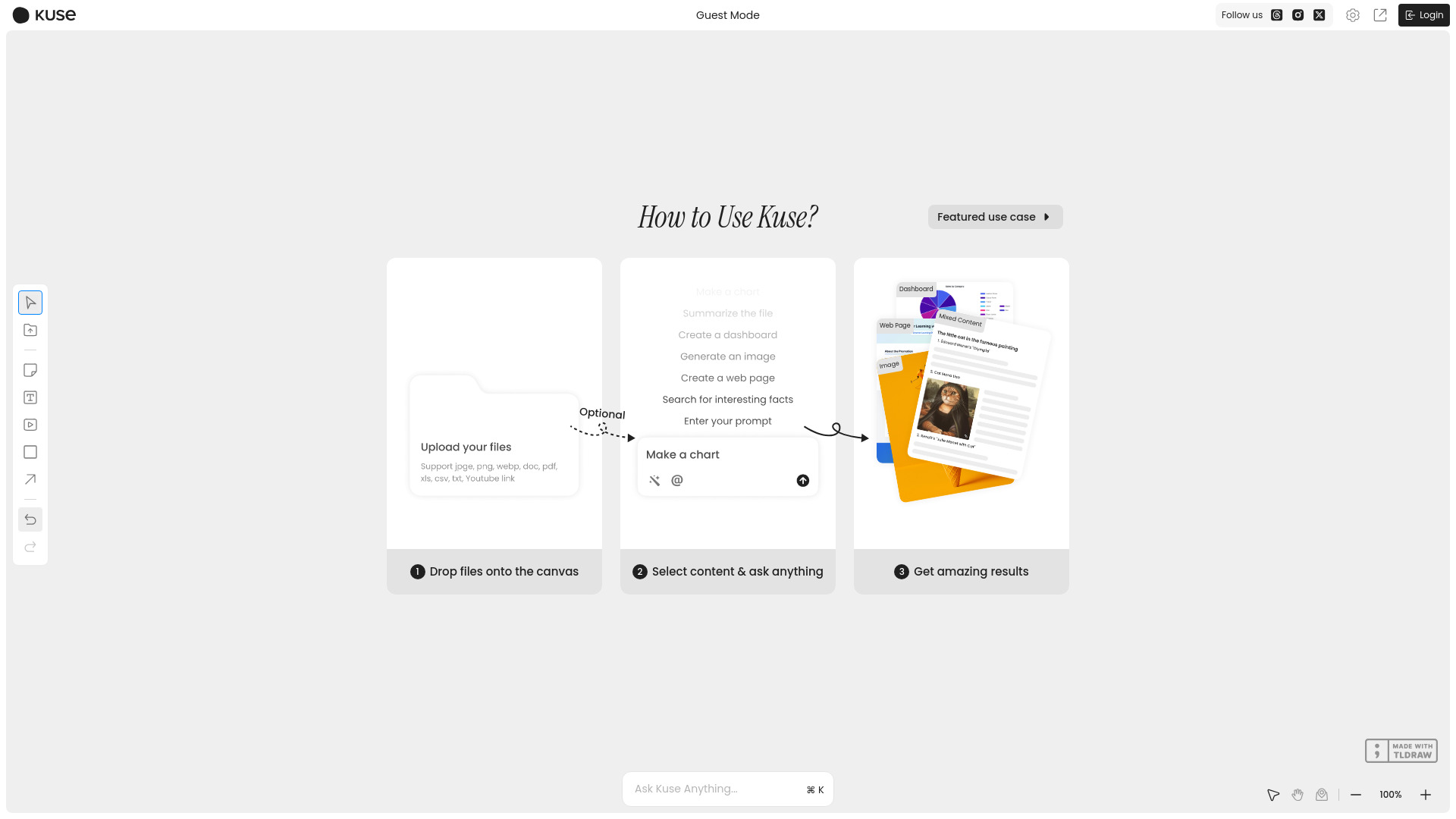
- Gather inputs: upload files, add videos, or paste links relevant to your task or project.
- State intent: describe the goal, audience, and preferred output type (document, slides, page, meeting brief).
- Review the outline: Kuse analyzes content and proposes a structure with key sections and visuals.
- Generate a draft: produce the first version with tables, charts, and summaries drawn from your inputs.
- Refine: adjust tone, format, and emphasis; ask for expansions, compressions, or examples.
- Remix: convert the draft into another format (e.g., slides from a doc) while keeping the logic intact.
- Export and share: publish, download, or share with collaborators and save successful setups as templates.
Kuse AI Industry Use Cases
Consulting teams can compile client PDFs, market links, and notes into a briefing deck with an action plan. Marketing teams can turn campaign assets and analytics into a launch plan, content calendar, and executive summary. Product managers can transform interviews, feature lists, and roadmap notes into a strategy doc and stakeholder slides. Educators can convert lecture videos and readings into course pages and lecture decks. Sales teams can parse RFPs and competitor sites into a compliant proposal and a concise presentation.
Kuse AI Pricing
Current pricing and plan details are provided on the official Kuse AI website. Review available options and any trial access there before getting started.
Kuse AI Pros and Cons
Pros:
- Handles unstructured, multimodal inputs and unifies them into one workspace.
- Generates context-aware deliverables aligned to goal, audience, and tone.
- Saves time on drafting documents, slide creation, and meeting preparation.
- Produces structured, visual outputs such as tables, charts, and timelines.
- Remixes content across formats without duplicating effort.
Cons:
- Output quality depends on input clarity and the specificity of your brief.
- Requires human review for factual accuracy and brand alignment.
- Large files or long videos may increase processing time.
- Template or layout fidelity may need manual tweaks for final polish.
Kuse AI FAQs
-
Can Kuse AI combine files, videos, and web links in one project?
Yes. It ingests multiple sources and synthesizes them into a single, structured output with references to the originals.
-
How does Kuse AI keep the right tone and style?
You can specify audience, voice, and formatting preferences or use templates. Kuse then adapts the draft to match those settings.
-
Can it turn a document into a slide deck?
Yes. The remix capability converts content across formats, preserving structure while adjusting for slide-friendly layouts.
-
Does Kuse AI show where information came from?
Outputs can retain ties to your inputs, helping you trace statements back to files or links for verification.
-
Is Kuse AI useful for meeting preparation?
Yes. It can generate agendas, briefings, and follow-ups from notes and references, tailored to the meeting’s purpose and attendees.